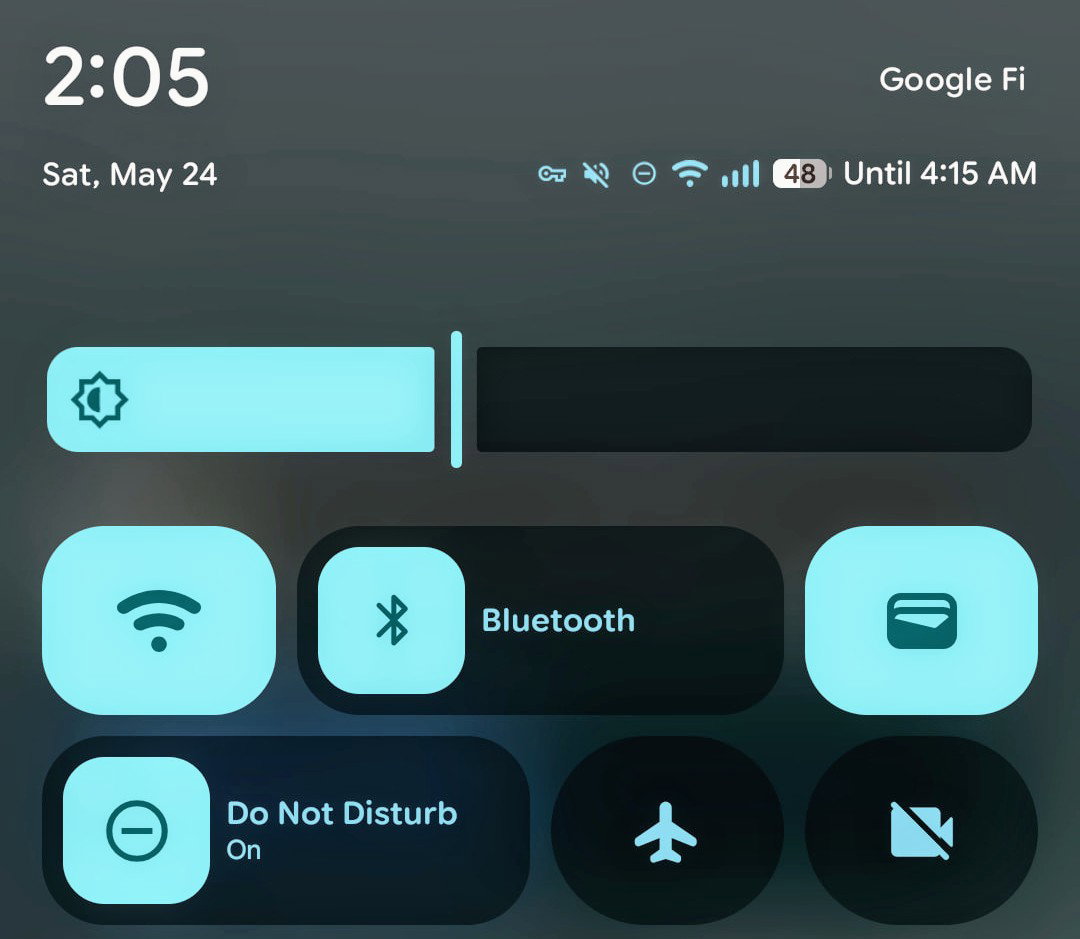
Google rolled out Android 16 QPR1 to Pixel phones on September 3, 2025, delivering the Material 3 Expressive redesign that transforms the visual experience across the operating system. The quarterly platform release includes Desktop Mode for supported devices and Live Updates notifications, marking the first substantial changes since Android 16’s understated June debut.
Which Pixels Get Android 16 QPR1
The update supports every Pixel from the 6 series forward:
- Pixel 6, 6 Pro, 6a
- Pixel 7, 7 Pro, 7a
- Pixel 8, 8 Pro, 8a
- Pixel 9, 9 Pro, 9 Pro XL, 9 Pro Fold, 9a
- Pixel Fold and Pixel Tablet
- Pixel 10 series (pre-installed)
Installation happens through Settings > System > Software updates. Advanced users can download factory images or OTA files for manual installation. The update carries build number BD3A.250721.001 for most devices, bundled with September 2025 security patches.
Material 3 Expressive: What Actually Changed
Android 16 QPR1 introduces Material 3 Expressive, the first comprehensive visual update since Android 13 launched in 2022. The redesign touches nearly every system interface with new animations, updated typography, and refined color treatments.
Lock Screen Updates
The lock screen moves date and weather information below the time display, creating cleaner visual hierarchy. Clock customization offers rounded or angular styles with adjustable stroke thickness. Weather effects overlay atmospheric animations – rain, snow, fog, or sunshine – matching current conditions when enabled.
Notification presentation shifts to a smarter approach: new notifications appear as full banners while previously seen alerts collapse into minimal icons. Users retain quick access to all notifications without the visual overload of constant banners.
Quick Settings Transformation
Quick Settings tiles now resize dynamically. The standard 2×1 rectangles can shrink to 1×1 squares, allowing up to 16 tiles per page versus the previous eight. Smooth morphing animations transition tiles from pills to rectangles when activated.
Bluetooth and mode toggles (like Do Not Disturb) return to single-tap activation after Android 15 required long presses. The brightness slider abandons its bubble design for a cleaner rectangular appearance. A reorganized tile editor groups related functions into categories: connectivity, device controls, accessibility, and more.
Interface Refinements Throughout
A new system font increases character width and readability while maintaining space efficiency. The Settings app replaces gray icons with color-coded circles – blue for network settings, green for battery, orange for sound – improving navigation speed.
Background blur effects add depth to the notification panel, Quick Settings, and app drawer. The volume slider animates with waveforms during media playback. Small details accumulate: the Pixel Launcher’s At a Glance widget shrinks to free a full row for apps, while the app drawer slides up as a sheet rather than consuming the entire screen.
Desktop Mode Arrives (In Beta)
Desktop Mode launches for Pixel 8 and newer devices with USB-C display output capability. Hidden in developer options (Settings > System > Developer options > Enable desktop experience features), the feature creates a computer-like environment on external monitors.
The desktop interface presents a bottom taskbar showing running and pinned applications. Windows resize freely and snap to screen edges. An overflow button reveals recent apps in a scrollable carousel. Users can pin favorites directly from the app drawer for quick taskbar access.
Google built Desktop Mode collaborating with Samsung, leveraging Samsung DeX foundations. While functional, the preview status shows: some apps don’t scale properly, certain desktop conventions remain absent, and performance varies by display. The feature targets productivity users seeking laptop-alternative functionality from their phones.
Live Updates Keep Information Visible
Live Updates bring persistent notifications for time-sensitive information. These special notifications maintain prominent placement on the lock screen and create expandable chips in the status bar. The Always-On Display renders them as wireframe outlines, ensuring visibility without battery drain.
Current implementation covers delivery tracking, ride-sharing ETAs, and workout progress. The system mirrors iOS Live Activities, keeping important information accessible without repeated phone unlocking. Developer adoption will determine whether Live Updates becomes essential or remains niche.
Stability and Performance Fixes
Android 16 QPR1 resolves numerous issues from the beta period. Battery drain affecting Pixel 6 and 7 series devices has been addressed. Camera lag and processing delays, particularly on Pixel 8 devices, show marked improvement.
Critical fixes include:
- RTOS memory corruption causing system crashes
- Launcher failing to display properly after restarts
- Navigation buttons becoming unresponsive in app drawer
- Media controls not reflecting playback position
- Settings crashes when accessing battery statistics
- Lock screen date text truncation with wide clock styles
Smaller Improvements Worth Noting
The recents overview adds dropdown menus to each app card, exposing split-screen and app info options previously hidden behind long presses. Fingerprint settings gain a verification tool – tap to scan and identify which fingerprint corresponds to which finger.
Phone calls and Gemini Live sessions create tappable status bar chips opening floating control panels. Users access mute, speaker, and end call functions without leaving their current app. The wallpaper picker remembers color palette preferences across changes, maintaining visual consistency when switching backgrounds.
Developer Impact and App Compatibility
System-level Material 3 Expressive changes apply immediately, but individual apps require updates for full design consistency. Google’s apps receive gradual updates through Play Store releases. Third-party developers can implement Material 3 Expressive components using updated Android or Jetpack Compose libraries.
Desktop Mode APIs enable multi-window support for developers targeting Android 16. Enhanced window management capabilities allow apps to adapt between phone, tablet, and desktop contexts. Most existing apps function without modification, though optimization improves the experience.
What Comes Next
Android 16 QPR2 entered beta testing following the August Pixel 10 launch event, with stable release expected December 2025. Google’s quarterly release schedule ensures regular feature additions beyond traditional annual Android updates.
The staged rollout continues through the week. Devices typically receive the update within 3-5 days of initial release. Users enrolled in Android Beta should opt out before updating to avoid automatic QPR2 beta enrollment.
The Android 16 QPR1 Verdict
This quarterly update delivers what June’s Android 16 release lacked: visible change and meaningful features. Material 3 Expressive refreshes Android’s aging Material 3 design language. Desktop Mode, though preview-quality, hints at Android’s productivity ambitions. Live Updates solve a real problem for information accessibility.
Not every change will resonate – some users have found the rounder font childish, others may question Desktop Mode’s readiness. But after years of incremental Android updates that seemingly barely registered with users, QPR1 demonstrates Google’s renewed focus on platform evolution through quarterly releases rather than annual milestones.
More News
- Font Manager 2.0: custom fonts on more Android phones
- Why We Left Cloudflare and Hetzner, and What Else Is New at Androidacy
- Underneath all the AI noise, Google I/O 2026 shipped Android 17, Wear OS 7, and the end of ChromeOS
- Googlebook is the ChromeOS-Android merge Google would not confirm
- Absolutely free premium for life