Font Manager’s last update reached Google Play on 25 October 2024. The next one starts rolling out today, to phones on Android 9 or newer: twenty-one months, 1,249 commits and 561 changed files later, with every screen in the app rebuilt.
It still does the one thing it always did: put the font you want on your phone. Underneath that, almost nothing survived. There is a new install engine, a new interface, a new storage layer and a new networking stack. The version you install today is 2.0.1, a hotfix that followed 2.0.0 closely enough that most people will never see 2.0.0 at all.
You will not recognize it
That is not a figure of speech. 1.18.4 was still built the old way: 29 XML layouts, seven XML settings screens, and seven activities, one per screen, with exactly one file in the whole project touching Compose. 2.0 has no layout XML at all. Every screen you tap through is new code, which is why it looks unfamiliar for the first minute even if you have used the app for years.
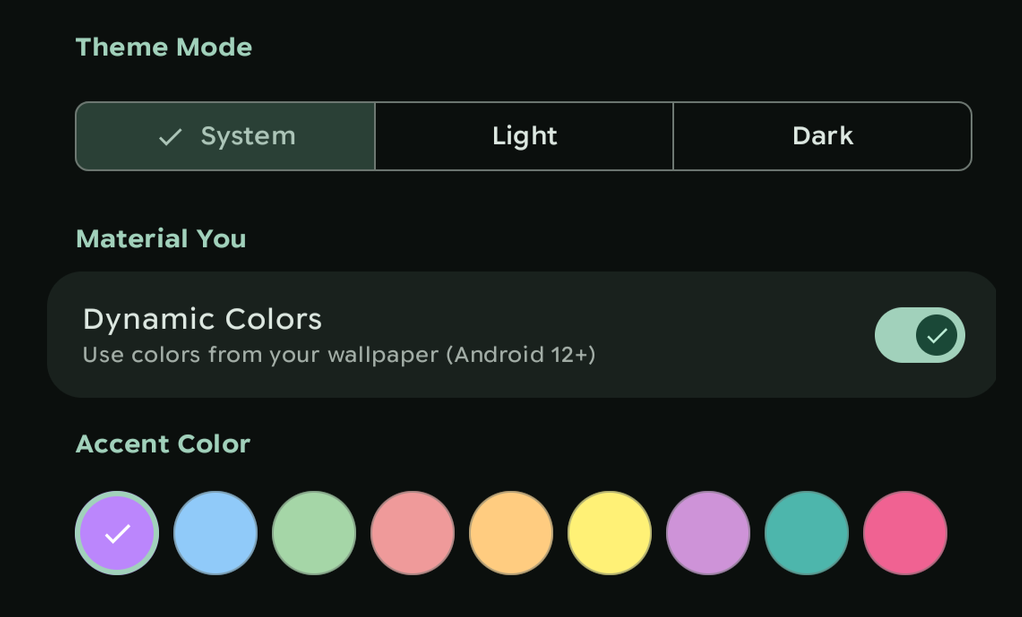
The interface is Material 3 Expressive, and most of the difference is in how things behave rather than how they sit. Progress indicators are wavy. Motion runs on springs rather than fixed curves, shapes morph between forms, and headlines and primary actions are set larger and heavier than everything around them. The app reads as one piece.
Google’s own eye-tracking research found people’s eyes landing on key controls up to four times faster than in the non-expressive equivalents, and the usual gap between older and younger users mostly closing.
In the app, navigation floats above the content rather than sitting welded to the bottom edge, and on a tablet the layouts open out into the extra width, putting the list and the detail side by side, rather than stretching a phone layout until it looks thin.
Light, dark and system themes are free, and so are the default palette and the one Android builds out of your wallpaper. The other palettes are Pro, along with the pure black theme for OLED screens. New in 2.0: a toggle that renders the app’s own interface in your system font, including a font Font Manager installed itself.
Accessibility got attention this time: better TalkBack support, and a pass over the interface generally. Reduced motion is now respected across the whole app, where before it came down to whichever components happened to honor it on their own. Turn animations off in Android’s settings and the moving background on the home screen holds still, the announcement banner stops advancing by itself, and the app picks the change up while it is running, with no restart.
The first-run flow, the home screen and settings were all reorganized around one thing: the shortest clear path from opening the app to a font on your phone.
Look before you install
There are over 200 typefaces in the catalog, and you can see any of them rendered on your own screen, at the size you actually read at, before you commit to anything. Previewing works on every device, whatever install path you end up on.
A preview is now one small rendered image, fetched once and kept, so a font you have already looked at draws the instant you open it again. 1.18.4 had to download and unpack the regular, bold and italic files before it could show you a single letter.
The catalog is one source of fonts. A file already on your device is another: if you have a font you want, you can install it directly, on any install path. And nothing about an install is permanent: the original font can go back at any time.
Free accounts get a daily download allowance at reduced speed; subscribing lifts the cap and the speed. The catalog is the same catalog whatever you pay. Subscriptions are also what pay for the work, on this app and the ones alongside it.
Three ways a font gets applied
What happens when you press install depends on your device. 2.0 works out which path you are on and says so on screen. On 1.18.4 there was one answer for phones without root: you could look, but not install.
With root, Font Manager replaces the system font itself. The launcher, Settings, notifications and every app drawing with the system font all change together.
On a Samsung running a One UI release that still accepts outside fonts, you get the system font changed without root at all. The server builds a signed font package in the format Samsung accepts, known as FlipFont. The app passes it to your file manager through the share sheet, you install it from there, and it turns up under Settings, Display, Font style for you to pick.
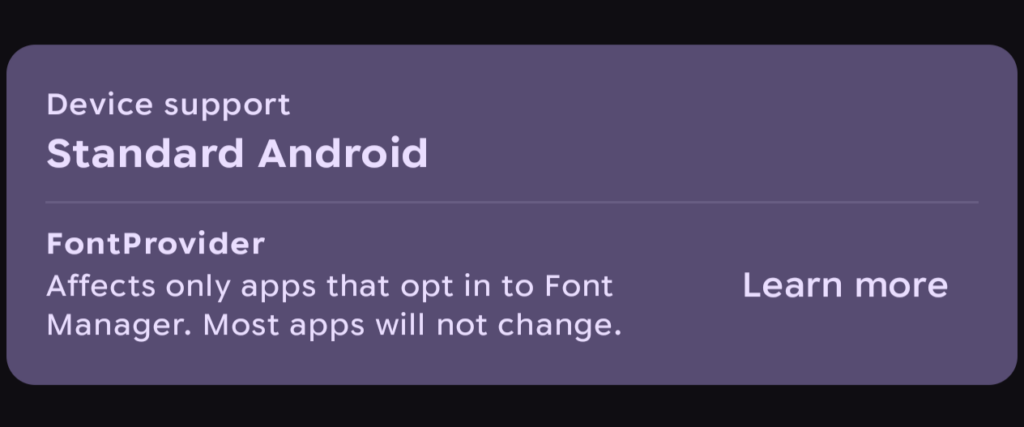
Everything else, Galaxy phones on newer One UI releases included, gets the third path. The font is published through Android’s font provider system, where an app can request it by name. That is a narrower thing than it sounds: an app reaches it by implementing the provider contract and asking Font Manager for the font, so it covers apps built to do that rather than apps in general. Androidacy’s own apps are adding support, and the ones still to come will ship with it. Any app can. If there is one you want your font to reach, its developer is the person to ask, and everything they need to add support sits inside Font Manager. The system interface does not change on this path.
Samsung added signature checks to its font settings in a 2026 security patch, and it now accepts only fonts signed by Samsung or its font partner. Font Manager supports the One UI releases that came before that change, which is why a newer Galaxy lands here instead of on the FlipFont path.
Below all three, install strategies are written per manufacturer, with a generic fallback for devices that do not have a tailored one, so an unusual device degrades to something workable instead of failing outright.
What no install path can do
An app that ships a typeface inside its own APK keeps using it. That holds on all three paths, root included.
Whichever path you are on, Font Manager works through the system. It cannot reach into an app that never asks the system for a font.
Work is underway for 2.1.0 on pushing that boundary: overriding the fonts particular apps bundle for themselves. It is root-only by nature and may ask extra steps of you. There is no date on it.
Choose which family gets replaced
1.x replaced the default sans-serif family on every install and gave you no say in it. 2.0 can target sans-serif, serif, monospace, or a family you name, so you can leave your reading font alone and change only the monospace one apps use for code.
Family targeting is in early access, which is one of the things an Ultra subscription carries, and it is off by default. Once enabled it appears under Settings, then Premium, then Advanced. Off root it is one family at a time. Assigning several fonts to several families in a single pass needs root as well as Ultra.
Emoji packs
With root, an emoji pack installs the same way a typeface does, and the whole set changes.
Off root, less of the phone is in reach. 2.0.1 fixed emoji installs through Android’s font provider, so that path can carry an emoji pack at all, where before it could not. The same limit applies as it does to fonts on that path: an emoji set reaches an app that has implemented the provider contract and asks for it, which is each app’s own decision.
On the FlipFont path there is no emoji at all: that format only ever rebinds the text typeface, never the color emoji fallback.
Getting the install right, and knowing when it wasn’t
Many fonts now ship every weight in one file, thin through black. Font Manager works out what is actually in there by reading the file itself, whatever its origin: catalog downloads, files you supply and restores from a backup all get the same treatment.
Getting that right is why bold comes out bold, light comes out light, and a font’s real italics get used where it has them instead of Android slanting the upright one to fake it. Getting it wrong is not a matter of text looking slightly off. Hand the system a set of weights it cannot resolve and a rooted phone stops booting.
Recovery matters most on rooted installs, and it is not a new idea here. 1.x cleaned up after a failed install and re-applied your font on a schedule. What 2.0 adds is knowing whether any of it worked.
An install is staged and then applied as one journaled transaction. The old cleanup only ran if the app survived long enough to do it; 2.0 records each step as it goes, so an install interrupted by a crash or a reboot is either finished or unwound the next time you open the app.
Verification after the reboot was improved in Font Manager 2.0. The app re-reads what the system actually loaded and compares it against what was staged. On a mismatch it re-applies once, then shows a card with a one-tap retry if it didn’t work. 1.x re-applied on a timer without ever checking the result, which meant a font that quietly failed to take stayed quietly failed.
The periodic check that catches a system update or a theme engine overwriting your font now runs off that same comparison.
And if a font install stops the device booting, the module disables itself after repeated failed boots. You reboot normally and the app explains what happened. On 1.x, that wasn’t as reliable, sometimes requiring safe mode to get out of.
Root work without the shell
1.18.4 did its root work through libsu, a third-party library, nearly all of it inside a single file 3,267 lines long. 2.0 does it through a small helper written in-house, running with root, which turns the file reads, writes, permission changes and reboots an install needs into direct system calls. Nothing is shelled out for them.
Going direct is quicker than starting a shell for every operation, and it removes a class of failure that was never anything to do with your device: in the restricted environment install work runs in, some of those commands were failing outright, a plain rm among them. Over 180 places in the old code ran a shell command or a root file operation. Where shell calls are left, all of them are fallbacks for the few things with no direct equivalent, and none of them in the loop that writes your font files. Owning that layer also settles who fixes it, and how fast. A bug in the old arrangement meant waiting on an upstream release; a bug in this one is ours to ship.
Speed, downloads and battery
Startup work happens appreciably faster, getting work done in parallel. Preferences, data migration, push registration and post-install checks all run in parallel, and the first screen draws without waiting on any of them.
Big files move through in pieces at both ends now. Downloads are written to disk as they arrive, where 1.18.4 held the whole file in memory before writing any of it, and installing reads back from that copy the same way. Memory use no longer scales with the size of what you are installing, so a large emoji pack stops being a bet on how much RAM your phone has to spare. Downloads are also checked against the server’s checksum on the way in, so a corrupted file is caught rather than installed.
A font you have already downloaded is reused; 1.18.4 unpacked its own cached copy afresh every time. A server that cannot be reached gives up in about five seconds, where 1.18.4 could sit there for a minute.
Background work still happens, as is the case with many apps. There is much less of it, and it runs when there is a reason to. Nothing ticks away unnecessarily while the app is open: work happens when it arrives, where 1.18.4 checked for it once a second the whole time it was running. The app also asks for two fewer permissions than it used to, having stopped needing them.
On root, more of the same. The boot-time check runs in the background under a time limit, and does nothing at all when your font is intact. On 1.18.4 it ran on the main thread with no limit and nobody there to approve the root prompt, which could hang the app at startup. The periodic check keeps the schedule it always had, but a run where nothing is wrong now costs almost nothing: it stops as soon as the comparison matches, where 1.18.4 re-applied your font every time regardless. Work that used to be redone on every question, like reading your device’s font layout, happens once and is kept until a system update changes it.
What 2.0.1 fixed
2.0.0 went out with a handful of problems bad enough to halt the rollout, which is why 2.0.1 exists and why most of our community never saw 2.0.0 itself.
The largest was on root. Installs needing to modify any partition other than /system reported success and changed nothing at all due to a defect in the module layout logic. That covers Samsung’s /systemext, Xiaomi’s /myproduct, and any device whose fonts live in /product.
Settings carried across from 1.18.4 arrived corrupted. Themes silently reverted to system, and stored font family names matched nothing. 2.0.1 repairs those values in place without user intervention, and anything you changed since installing 2.0.0 is kept.
Off root, installing a local font file went down the rooted pipeline instead of the routing that picks your install path, so it could not work. Emoji packs were offered on the FlipFont path, which cannot carry them, and then failed at the end of the install instead of being refused at the start; they are gated up front now. Restoring from sync could drop the emoji half and say nothing, and now says so, whether the device cannot carry emoji or the emoji install failed.
A long install could be cut short by the screen going off. A large emoji pack can take the better part of a minute, which is easily long enough for that to happen, so 2.0.1 holds the CPU awake for the whole download and install.
On root, a boot-time check that finds your font missing and reapplies it now tells you a reboot is needed, rather than fixing it quietly and looking like nothing happened.
On some distribution channels a packaging bug made root look as though it had gone, with every root feature reporting no access. Play installs were never affected.
2.0.1 is also 64-bit only. 2.0.0 offered itself to phones with no 64-bit support, where it shipped without the libraries it depends on and closed itself the instant it opened. That hardware is not offered the update any more, and there is very little of it: 64-bit has been standard on Android for about a decade.
The Android 9 floor was decided under the same logic. Every release still supported is another set of code paths to keep working, and 8.0 stopped getting security updates from Google in 2021.
The rest is smaller: crash and layout fixes, and help content that had gone out of date.
Twenty-one months
There is no version of this where the gap was what we wanted. What it bought is an app that picks your install path deliberately instead of assuming one, keeps the shell out of the work that writes your fonts, and can tell you when an install did not take rather than leaving you to notice. It also brought an app that’s a joy to use and interact with.
A rewrite this size has corners nobody has walked into yet. When you find one, tell us using the links below.
1.x no longer gets updates. Anything broken in it stays broken, and at some point the servers stop answering it too. If you are still on 1.18.4, 2.0.1 is the update worth taking.
Font Manager 2.0.1 is on Google Play now. Direct downloads go up at androidacy.com/downloads once the rollout is further along.